How to Write Content That Ranks: My Outline Process
The exact research-to-outline process I've used on hundreds of blog posts, with every Ahrefs step, a real example, and the prompt I use to turn the research into an outline.
Sep 30, 2026 · SEO, content strategy, AI
I’ve built outlines this way for hundreds of blog posts, at universities and for client sites. One of them, a Furman University post called “What Are the Different Levels of College Degrees?”, is #1 in both Google’s AI Overview and the traditional results when I search levels of college degrees from Greenville, South Carolina. Nationally, Ahrefs puts it at #2 for college degree levels, ranking for 849 keywords and drawing an estimated 12,800 visits a month.
That post came out of the process below. I didn’t invent it from scratch: it’s inspired by an approach I read from Ahrefs years ago. What I’ve done is adapt it to work for universities, and speed up the slowest step with AI.
The heart of it is the outline. A writer can’t hit a target they can’t see. The outline tells them what to cover, in what order, and what each section is for, and it bakes the SEO in before the first word is written. Get the outline right and you’ve done most of the work of ranking.
Below is the whole process, using that degree-levels post as a real example. All the data is from Ahrefs.
Step 1: Start from a topic you can own
For a university, the best topics sit close to what you actually offer. Some of my posts start from a degree program: take biology, and find the questions people ask about it, like “What can you do with a biology degree?” Others cover broader college questions that prospective students research long before they pick a school, like the different levels of college degrees.
Either way, the topic should give you a natural path from the article to a program page.
Step 2: Pick a keyword you can win
Plug the topic into Keywords Explorer and look at four numbers:
- Search volume: how many people search for it each month.
- Keyword difficulty (KD): how hard it is to crack the top 10.
- Traffic potential: how much traffic the #1 page gets across all its keywords. This matters more than volume, because a good page ranks for hundreds of related searches, not just one.
- Parent topic: the broader search Ahrefs thinks you can rank for while targeting this one.
For our example, levels of college degrees gets about 1,700 searches a month with a KD of 0 and a traffic potential of 11,000. The parent topic is college degree levels, at 2,600 searches. High potential, almost no difficulty: that’s the profile I look for.
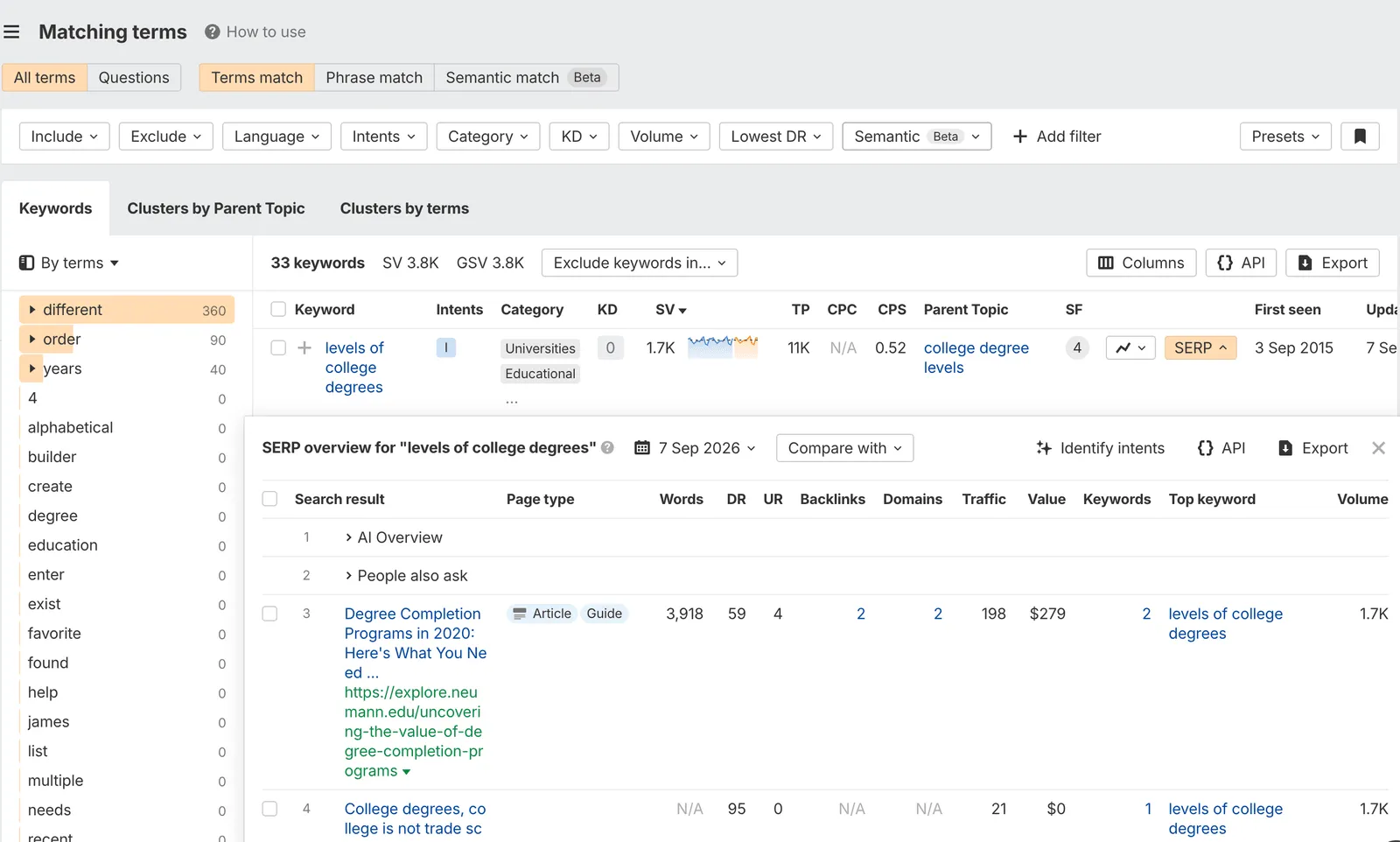
Ahrefs Keywords Explorer and SERP overview for the target keyword.
Step 3: Choose the three pages to beat
Scroll down to the SERP overview and pick the top three pages that match what you’re writing. Skip results that are a different format, like forum threads or Wikipedia, if you’re writing a guide. You want to study pages trying to do the same job yours will.
For college degree levels, setting the Furman post aside as if it didn’t exist yet, the three guides to beat are:
| Page | Position | Est. monthly traffic | Keywords it ranks for |
|---|---|---|---|
| SNHU, “What Are the 4 Types of College Degree Levels?” | AI Overview | n/a | n/a |
| University of Phoenix, “College Degree Levels in Order” | #4 | 1,691 | 393 |
| UPI Study, “College Degree Levels: Costs, Time, and Salaries” | #6 | 413 | 169 |
Ahrefs SERP overview, US, September 2026.
Step 4: Export each page’s keywords
Open each of the three URLs in Site Explorer, go to Organic keywords, and export the list. This shows every search the page already wins, which is the closest thing you’ll get to a map of what Google thinks the topic covers.
The Phoenix page alone ranks for hundreds of keywords, including levels of degrees and degree levels.
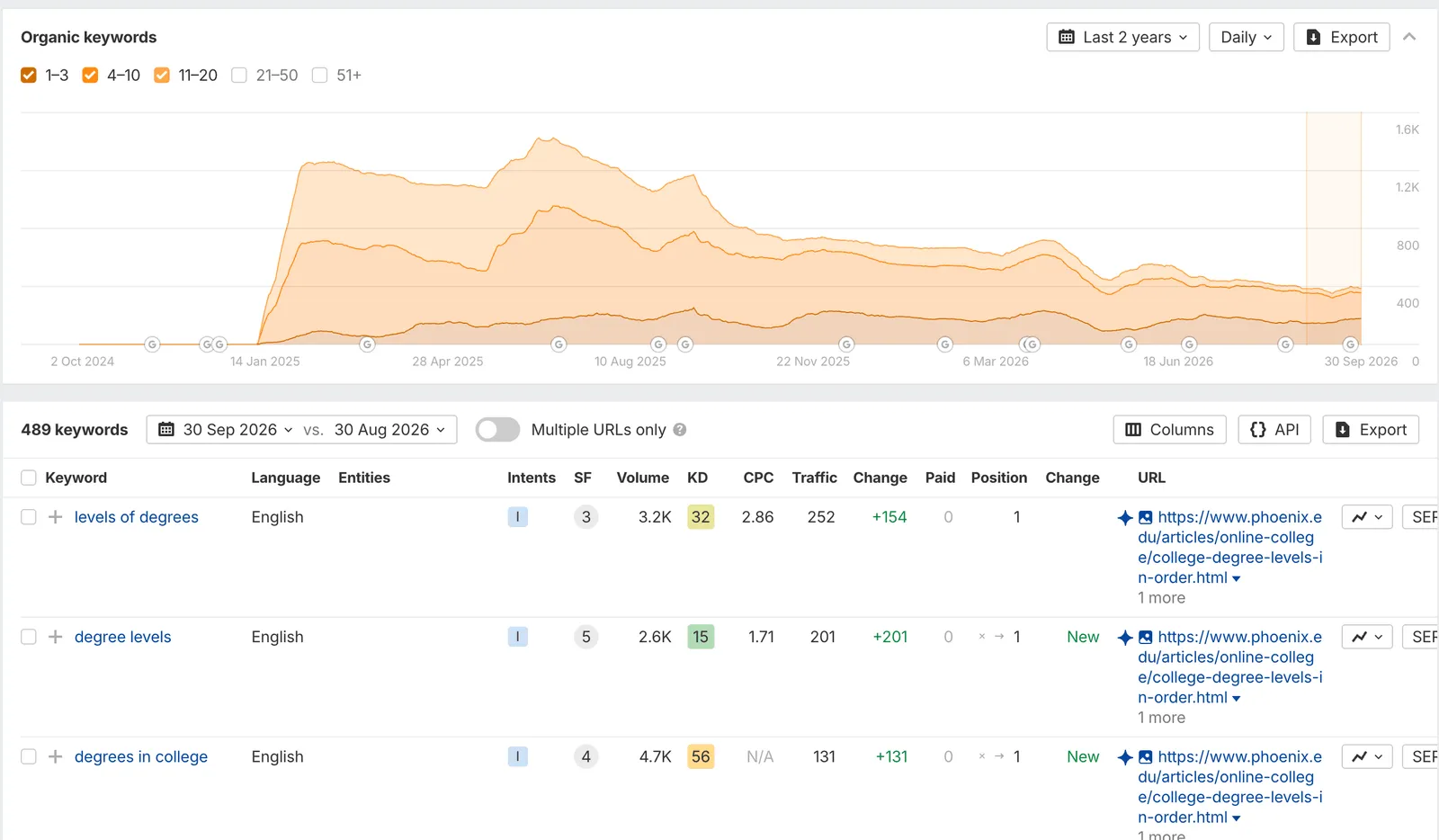
Ahrefs Organic Keywords for one of the competing pages.
Step 5: Read the pages themselves
Data tells you what to cover. Reading the pages tells you how. For each of the three, I note:
- the sections and subsections it covers
- the questions it answers
- the threads all three have in common
- the gaps: what none of them cover that a reader would want
The common threads are the price of entry. The gaps are how you become the most complete page in the results.
Step 6: Find the clusters they share
Put the three keyword exports side by side and look for overlap. Keywords that multiple pages rank for are the themes Google clearly connects to the topic. For our example:
| Cluster | Example keywords (monthly searches) | Pages ranking |
|---|---|---|
| Degrees in order | college degrees in order from lowest to highest (2,600), degree levels (2,600) | All three |
| The 4-year degree | what degree is 4 years of college (1,700), 4 year degree name (1,500) | All three |
| The highest degree | highest degree in college (1,900), whats the highest degree (600) | All three |
| The 2-year degree | 2 year college degree (1,900), 2 year degree name (1,300) | All three |
| Types and lists | types of degrees (5,400), list of college degrees (3,800) | Two of three |
Each cluster deserves a section. Merging overlapping keywords into one heading is what keeps the outline tight instead of bloated.
Step 7: Turn the research into an outline with AI
This used to be the slowest step. Now I hand the three keyword exports to an AI model with a prompt that does the clustering and drafts the outline. Here’s a version you can use in ChatGPT, Claude, or anything else that accepts file uploads:
You are an SEO content strategist. Build a competitive blog outline from
the keyword lists I've uploaded, which come from the top three pages
ranking for my target keyword.

Potential H1: [your working title]
Primary keyword: [your target keyword]

1. Use the Potential H1 verbatim as the H1.
2. Analyze all three keyword lists first. Find the recurring keyword
   themes, shared entities, search intent patterns, and topic gaps.
3. Cover the most important recurring clusters. Merge overlapping
   clusters into one section instead of giving every keyword a heading.
4. Use H2s only. Don't create headings just to force in a keyword.
5. Write a title tag and meta description that use the primary keyword
   naturally, without stuffing.
6. Keep it skimmable, logically ordered, and complete without being
   bloated. Skip an FAQ or conclusion unless they genuinely help.

Output only:
Title Tag:
Meta Description:
H1:
H2: (one per section)
If you’d rather not paste a prompt every time, this is the core of my Blog Outline Generator skill, which you can download free.
Here’s what that prompt returned for our example when I ran it in Claude with the three keyword exports:
Title Tag: College Degree Levels in Order: Associate to Doctorate

Meta Description: Learn the levels of college degrees in order, from
associate to doctoral, including how long each one takes and how to
choose the right degree for your goals.

H1: What Are the Different Levels of College Degrees?

H2: College Degrees in Order From Lowest to Highest
H2: Associate Degree: The 2-Year College Degree
H2: Bachelor's Degree: What a 4-Year Degree Is Called
H2: Master's Degree: Graduate-Level Specialization
H2: Doctoral Degree: The Highest Degree You Can Earn
H2: Undergraduate vs. Graduate Degrees
H2: How Long Does Each Degree Take?
H2: Certificates, Minors and Other Credentials
H2: How to Choose the Right Degree Level for Your Goals
Every cluster from Step 6 has a home, and none of them takes up more than one heading.
Step 8: Edit the outline into a brief
AI gets you a strong draft, not a finished brief. I always:
- trim headings that repeat the same intent
- fix anything inaccurate, especially program details and policies
- check fit: is this something our institution should be writing about?
- add notes for the writer: where to cite data (for salaries, the Bureau of Labor Statistics), where a faculty quote or student story would add real expertise, and which program pages to link to
The finished brief is short: the primary and secondary keywords, the title tag and meta description, the outline, a target length, the page to beat, internal links, and those writer notes.
Step 9: Write, review, and publish
The writer drafts from the brief. Then it goes through review: my SEO pass for keywords, links, and the slug, an editor, and someone from the relevant college or department to check accuracy. That last step matters for universities in particular. Faculty review is what makes the content trustworthy, and trust is what Google and AI answers reward.
After it goes live, I link to it from relevant existing pages so it starts with some internal authority.
The result
The Furman post went live in February 2024. Searching levels of college degrees from Greenville, it’s the first source in Google’s AI Overview, cited throughout the answer, and the #1 traditional result:
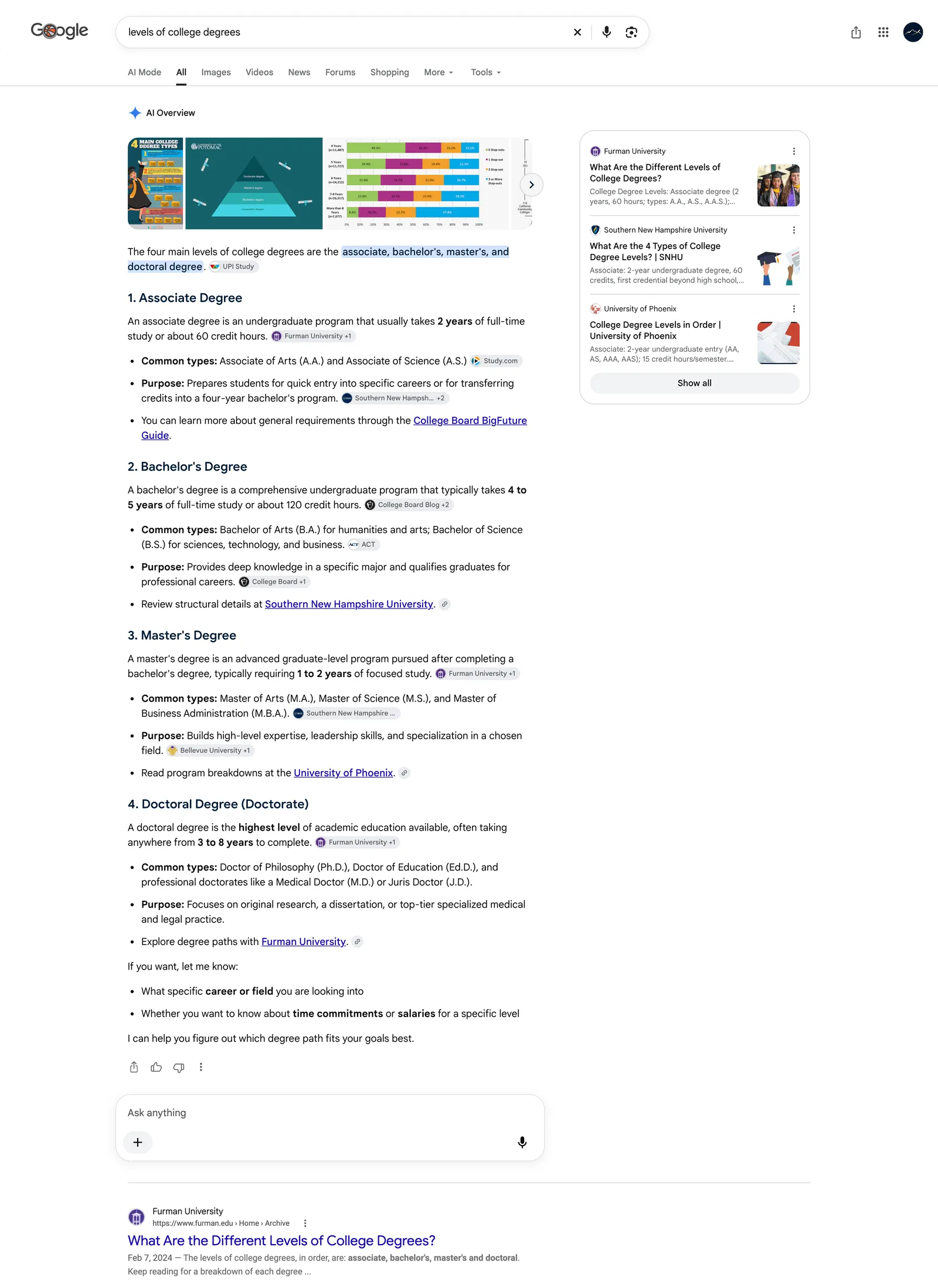
Google search for “levels of college degrees” from Greenville, South Carolina, September 2026.
Rankings shift with location, so your results may differ. Nationally, Ahrefs puts the post at #2 for college degree levels, ranking for 849 keywords and drawing about 12,800 estimated visits a month, more than the University of Phoenix and Wikipedia pages around it. Keep in mind that Ahrefs numbers are estimates modeled from its own data, not a perfect copy of Google. Google is the source of truth. Ahrefs is directionally right, and directionally right is what you need to make good SEO decisions.
I used this same process for about 35 posts at Furman. Within a year, that small blog was drawing 68,822 visits a month. You can read the full story in the Furman case study.
Why it works
None of this is magic. It works because it’s built on evidence instead of guesses:
- You write for what Google already rewards. The keyword exports show you exactly which questions the winning pages answer.
- You cover the topic more completely than anyone else. Common threads plus gaps equals the best page on the subject.
- Your writers know exactly what to do. A clear outline means fewer rewrites and faster publishing.
The best way to know what will rank in Google is to look at what already ranks in Google. This process just makes that repeatable.